
关于此 MOD
此.bat文件/启动器允许你拥有9个不同的模组配置,你可以通过按一下按钮在它们之间即时切换。
这是完整代码,想用的话直接把这段复制到.txt文件里,然后保存为.bat文件就行,不用下载这个。
ModSwitch
在我的单人世界里,我装了大约60个模组来玩。
在我和朋友共同创造的世界里,我玩的是原版,因为我朋友不喜欢模组。
在我想加入的一个热门服务器中,有一份允许使用的模组列表,使用其他模组是被禁止的。
Vortex 有一个模组配置功能,但对我来说太慢了。
我也不喜欢其他的模组管理器。我喜欢手动安装我的模组。
于是我做了一个.bat启动器,让你可以在原版和9种不同的模组配置之间进行选择。
它是怎么运作的?
首次运行脚本时,它会在你的BepInEx文件夹中生成大量新文件夹。
这些新文件夹被命名为plugins1、plugins2、……、plugins9、config1、config2、……、config9
你已有的任何旧模组及其配置都将被移到plugins1和config1文件夹中。
当你在ModSwitch.bat的菜单中选择一个数字时,
它会查找包含该编号的文件夹,并从文件夹名称中移除该编号。
若选择模组配置1,将启用plugins1中的模组并使用配置1。
如果你选择模组配置4,它将激活plugins4中带有config4的模组。
若选择原版,则将禁用BepInEx
如果你想让某个模组出现在多个配置文件中,你需要为每个配置文件分别重新安装它。
因为每个配置文件的配置文件夹是分开的,你需要分别编辑它们的配置。
当你打开ModSwitch.bat时,它会先自动切换到原版模式。
若未选择即关闭窗口,将默认选择原版。
在你按下0以原版继续,或按下数字选择模组配置后,
将打开第二个菜单。此菜单有三个选项。再次选择(r)、启动《英灵神殿》(v)或退出(q)
选择档案后,你也可以退出程序,并像以前一样正常启动游戏。
安装
只需将ModSwitch.bat放入您的Valheim文件夹中,与valheim.exe放在同一位置即可。
(通常位于 C:\Program Files\Steam\steamapps\common\Valheim)
你也可以为ModSwitch.bat创建桌面快捷方式,用它来启动游戏。
配置
当你运行ModSwitch.bat时,它会在你的Valheim文件夹中生成这个ModSwitch.txt。你可以根据自己的偏好编辑它。
在我的单人世界里,我装了大约60个模组来玩。
在我和朋友共同创造的世界里,我玩的是原版,因为我朋友不喜欢模组。
在我想加入的一个热门服务器中,有一份允许使用的模组列表,使用其他模组是被禁止的。
Vortex 有一个模组配置功能,但对我来说太慢了。
我也不喜欢其他的模组管理器。我喜欢手动安装我的模组。
于是我做了一个.bat启动器,让你可以在原版和9种不同的模组配置之间进行选择。
它是怎么运作的?
首次运行脚本时,它会在你的BepInEx文件夹中生成大量新文件夹。
这些新文件夹被命名为plugins1、plugins2、……、plugins9、config1、config2、……、config9
你已有的任何旧模组及其配置都将被移到plugins1和config1文件夹中。
当你在ModSwitch.bat的菜单中选择一个数字时,
它会查找包含该编号的文件夹,并从文件夹名称中移除该编号。
若选择模组配置1,将启用plugins1中的模组并使用配置1。
如果你选择模组配置4,它将激活plugins4中带有config4的模组。
若选择原版,则将禁用BepInEx
如果你想让某个模组出现在多个配置文件中,你需要为每个配置文件分别重新安装它。
因为每个配置文件的配置文件夹是分开的,你需要分别编辑它们的配置。
当你打开ModSwitch.bat时,它会先自动切换到原版模式。
若未选择即关闭窗口,将默认选择原版。
在你按下0以原版继续,或按下数字选择模组配置后,
将打开第二个菜单。此菜单有三个选项。再次选择(r)、启动《英灵神殿》(v)或退出(q)
选择档案后,你也可以退出程序,并像以前一样正常启动游戏。
安装
只需将ModSwitch.bat放入您的Valheim文件夹中,与valheim.exe放在同一位置即可。
(通常位于 C:\Program Files\Steam\steamapps\common\Valheim)
你也可以为ModSwitch.bat创建桌面快捷方式,用它来启动游戏。
配置
当你运行ModSwitch.bat时,它会在你的Valheim文件夹中生成这个ModSwitch.txt。你可以根据自己的偏好编辑它。
;;设置

;;您可以在此处更改模组配置文件的名称。
;;Name1 用于 plugins1 文件夹,Name2 用于 plugins2 文件夹,依此类推。
;;请不要在名称中使用特殊字符。
;;使用这些字符可能会破坏代码。

Name1=模组配置1
Name2=模组配置方案2
Name3=模组配置3
Name4=模组配置方案 4
Name5=模组配置5
Name6=模组配置6
Name7=模组配置7
Name8=模组配置8
Name9=模组配置9


;;如果你将此设置为true,在你选择一个模组配置后
;;它将直接启动游戏。跳过“r,q,v”菜单。
DirectLaunch=false


;;不要更改此内容
Current=0
;;请勿更改此项 剧透:
显示
@echo off
如果存在ModSwitch.txt(跳转到nfl)
首次启动
首次运行脚本。
请稍候,正在生成文件和文件夹。
你之前安装的所有模组都将移至模组配置1。
你可以编辑ModSwitch.txt来修改配置文件名和其他设置。
timeout 15 >nul
::ModSwitch.txt
echo ;;设置 > ModSwitch.txt
echo. >> ModSwitch.txt
echo ;;你可以在这里修改模组配置文件的名称。 >> ModSwitch.txt
echo ;;Name1是用于plugins1文件夹的,Name2是用于plugins2文件夹的,以此类推。 >> ModSwitch.txt
echo ;;请勿在名称中使用特殊字符。 >> ModSwitch.txt
使用这些角色可能会破坏代码。 >> ModSwitch.txt
echo. >> ModSwitch.txt
echo Name1=模组配置1 >> ModSwitch.txt
echo Name2=模组配置2 >> ModSwitch.txt
echo Name3=模组配置3 >> ModSwitch.txt
echo Name4=模组配置4 >> ModSwitch.txt
echo Name5=模组配置5 >> ModSwitch.txt
echo Name6=模组配置6 >> ModSwitch.txt
echo Name7=模组配置7 >> ModSwitch.txt
echo Name8=模组配置8 >> ModSwitch.txt
echo Name9=模组配置文件 9 >> ModSwitch.txt
echo. >> ModSwitch.txt
echo. >> ModSwitch.txt
;;如果将此设置为true,在选择模组配置后 >> ModSwitch.txt
echo ;;它将直接启动游戏。跳过“r,q,v”菜单。 >> ModSwitch.txt
echo DirectLaunch=false >> ModSwitch.txt
echo. >> ModSwitch.txt
echo. >> ModSwitch.txt
echo ;;你可以在这里修改Valheim的启动选项。 >> ModSwitch.txt
echo ;;示例: [-window-mode exclusive -screen-fullscreen -console -force-vulkan] >> ModSwitch.txt
echo LaunchOptions=-window-mode exclusive >> ModSwitch.txt
echo. >> ModSwitch.txt
echo. >> ModSwitch.txt
echo ;;请勿更改此处 >> ModSwitch.txt
echo Current=0 >> ModSwitch.txt
echo ;;请勿更改此行 >> ModSwitch.txt
cd BepInEx
::正在创建新文件夹
ren plugins plugins1
ren config config1
mkdir plugins >nul
mkdir config >nul
mkdir plugins2 >nul
mkdir config2 >nul
mkdir plugins3 >nul
mkdir config3 >nul
mkdir plugins4 >nul
mkdir config4 >nul
mkdir plugins5 >nul
mkdir config5 >nul
mkdir plugins6 >nul
mkdir config6 >nul
mkdir plugins7 >nul
mkdir config7 >nul
mkdir plugins8 >nul
mkdir config8 >nul
mkdir plugins9 >nul
mkdir config9 >nul
copy config1\BepInEx.cfg config\BepInEx.cfg >nul
copy config1\BepInEx.cfg config2\BepInEx.cfg >nul
copy config1\BepInEx.cfg config3\BepInEx.cfg >nul
copy config1\BepInEx.cfg config4\BepInEx.cfg >nul
copy config1\BepInEx.cfg config5\BepInEx.cfg >nul
copy config1\BepInEx.cfg config6\BepInEx.cfg >nul
copy config1\BepInEx.cfg config7\BepInEx.cfg >nul
copy config1\BepInEx.cfg config8\BepInEx.cfg >nul
copy config1\BepInEx.cfg config9\BepInEx.cfg >nul
copy plugins1\Valheim.DisplayBepInExInfo.dll plugins\Valheim.DisplayBepInExInfo.dll >nul
copy plugins1\Valheim.DisplayBepInExInfo.dll plugins2\Valheim.DisplayBepInExInfo.dll >nul
copy plugins1\Valheim.DisplayBepInExInfo.dll plugins3\Valheim.DisplayBepInExInfo.dll >nul
copy plugins1\Valheim.DisplayBepInExInfo.dll plugins4\Valheim.DisplayBepInExInfo.dll >nul
copy plugins1\Valheim.DisplayBepInExInfo.dll plugins5\Valheim.DisplayBepInExInfo.dll >nul
copy plugins1\Valheim.DisplayBepInExInfo.dll plugins6\Valheim.DisplayBepInExInfo.dll >nul
copy plugins1\Valheim.DisplayBepInExInfo.dll plugins7\Valheim.DisplayBepInExInfo.dll >nul
copy plugins1\Valheim.DisplayBepInExInfo.dll plugins8\Valheim.DisplayBepInExInfo.dll >nul
copy plugins1\Valheim.DisplayBepInExInfo.dll plugins9\Valheim.DisplayBepInExInfo.dll >nul
copy config1\org.bepinex.valheim.displayinfo.cfg config\org.bepinex.valheim.displayinfo.cfg >nul
copy config1\org.bepinex.valheim.displayinfo.cfg config2\org.bepinex.valheim.displayinfo.cfg >nul
copy config1\org.bepinex.valheim.displayinfo.cfg config3\org.bepinex.valheim.displayinfo.cfg >nul
copy config1\org.bepinex.valheim.displayinfo.cfg config4\org.bepinex.valheim.displayinfo.cfg >nul
copy config1\org.bepinex.valheim.displayinfo.cfg config5\org.bepinex.valheim.displayinfo.cfg >nul
copy config1\org.bepinex.valheim.displayinfo.cfg config6\org.bepinex.valheim.displayinfo.cfg >nul
copy config1\org.bepinex.valheim.displayinfo.cfg config7\org.bepinex.valheim.displayinfo.cfg >nul
copy config1\org.bepinex.valheim.displayinfo.cfg config8\org.bepinex.valheim.displayinfo.cfg >nul
copy config1\org.bepinex.valheim.displayinfo.cfg config9\org.bepinex.valheim.displayinfo.cfg >nul
cls
跳到开始
:nfl
:: 加载配置文件
cd BepInEx
:开始
cls
:: 加载配置文件
FOR /F "usebackq eol=; tokens=* delims=" %%# in (
    "..\ModSwitch.txt"
) 做 (
    调用设置“%%#”
) >nul
:: 将当前选择的配置文件更改为默认版
重命名插件 插件%Current%
ren插件0插件
ren config config%Current%
ren config0 config
powershell -Command "(Get-Content ..\doorstop_config.ini) -replace 'enabled=true', 'enabled=false' | Set-Content ..\doorstop_config.ini"
powershell -Command "(Get-Content ..\ModSwitch.txt) -replace 'Current=%Current%', 'Current=0' | Set-Content ..\ModSwitch.txt"
powershell -Command "(Get-Content ..\ModSwitch.txt) -replace 'Current=00', 'Current=0' | Set-Content ..\ModSwitch.txt"
默认已切换至香草版本。
:: 玩家昵称列表
echo 你想激活哪个模组配置?
echo.
回声0- [原版](默认)
1- [%name1%]
回音 2- [%name2%]
回声 3- [%name3%]
回声 4- [%name4%]
echo 5- [%name5%]
回声 6- [%name6%]
echo 7- [%name7%]
8- [%name8%]
回波9- [%name9%]
echo.
:: 选择菜单 1
本地化设置
选择 /N /C:1234567890 /M "按下其中一个按钮(0、1、2、3、4、5、6、7、8或9)"
IF ERRORLEVEL ==10 GOTO 0
IF ERRORLEVEL ==9 GOTO 9
如果错误级别==8 转到8
如果错误级别==7 跳转到 7
IF ERRORLEVEL ==6 GOTO 6
IF ERRORLEVEL ==5 GOTO 5
IF ERRORLEVEL ==4 GOTO 4
IF ERRORLEVEL ==3 GOTO 3
IF ERRORLEVEL ==2 GOTO 2
IF ERRORLEVEL ==1 GOTO 1
endlocal
:: 文件夹重命名工具
::0
按下 0
powershell -Command "(Get-Content ..\doorstop_config.ini) -replace 'enabled=true', 'enabled=false' | Set-Content ..\doorstop_config.ini"
当前选用的是原版。
转到结尾
::1
echo 按下1
powershell -Command "(Get-Content ..\doorstop_config.ini) -replace 'enabled=false', 'enabled=true' | Set-Content ..\doorstop_config.ini"
powershell -Command "(Get-Content ..\ModSwitch.txt) -replace 'Current=0', 'Current=1' | Set-Content ..\ModSwitch.txt"
ren 插件 插件0
plugins1 插件 插件
ren config config0
ren config1 config
当前选择的是%Name1%。
goto end
:2
按下2
powershell -Command "(Get-Content ..\doorstop_config.ini) -replace 'enabled=false', 'enabled=true' | Set-Content ..\doorstop_config.ini"
powershell -Command "(Get-Content ..\ModSwitch.txt) -replace 'Current=0', 'Current=2' | Set-Content ..\ModSwitch.txt"
ren 插件 plugins0
ren 插件2 插件
ren config config0
ren 配置2 配置
当前选中了 %Name2%。
跳至末尾
: :3
echo 按下 3
powershell -Command "(Get-Content ..\doorstop_config.ini) -replace 'enabled=false', 'enabled=true' | Set-Content ..\doorstop_config.ini"
powershell -Command "(Get-Content ..\ModSwitch.txt) -replace 'Current=0', 'Current=3' | Set-Content ..\ModSwitch.txt"
ren 插件 插件0
ren 插件3 插件
ren config config0
ren 配置3 配置
当前选中了 %Name3%。
goto end
:4
按下4键
powershell -Command "(Get-Content ..\doorstop_config.ini) -replace 'enabled=false', 'enabled=true' | Set-Content ..\doorstop_config.ini"
powershell -Command "(Get-Content ..\ModSwitch.txt) -replace 'Current=0', 'Current=4' | Set-Content ..\ModSwitch.txt"
ren 插件 插件0
ren 插件4 插件
ren config config0
ren 配置4 配置
当前选择的是 %Name4%。
转到结尾
:5
echo 按下了 5
powershell -Command "(Get-Content ..\doorstop_config.ini) -replace 'enabled=false', 'enabled=true' | Set-Content ..\doorstop_config.ini"
powershell -Command "(Get-Content ..\ModSwitch.txt) -replace 'Current=0', 'Current=5' | Set-Content ..\ModSwitch.txt"
ren 插件 插件0
ren插件5插件
ren config config0
ren config5 config
当前选中了 %Name5%。
goto end
:6
按下6
powershell -Command "(Get-Content ..\doorstop_config.ini) -replace 'enabled=false', 'enabled=true' | Set-Content ..\doorstop_config.ini"
powershell -Command “(Get-Content ..\ModSwitch.txt) -replace ‘Current=0’, ‘Current=6’ | Set-Content ..\ModSwitch.txt”
ren 插件 插件0
ren 插件6 插件
ren config config0
ren config6 config
当前选中了 %Name6%。
goto end
:7
echo 已按下 7
powershell -Command "(Get-Content ..\doorstop_config.ini) -replace 'enabled=false', 'enabled=true' | Set-Content ..\doorstop_config.ini"
powershell -Command "(Get-Content ..\ModSwitch.txt) -replace 'Current=0', 'Current=7' | Set-Content ..\ModSwitch.txt"
ren 插件 插件0
ren 插件 7 插件
ren config config0
ren config7 config
当前选中了%Name7%。
转到结尾
:8
echo 按下8
powershell -Command "(Get-Content ..\doorstop_config.ini) -replace 'enabled=false', 'enabled=true' | Set-Content ..\doorstop_config.ini"
powershell -Command "(Get-Content ..\ModSwitch.txt) -replace 'Current=0', 'Current=8' | Set-Content ..\ModSwitch.txt"
ren 插件 插件0
重插件 插件8 插件
ren config config0
ren config8 config
当前选中了%Name8%。
跳转到结尾
:9
echo 按下9
powershell -Command "(Get-Content ..\doorstop_config.ini) -replace 'enabled=false', 'enabled=true' | Set-Content ..\doorstop_config.ini"
powershell -Command "(Get-Content ..\ModSwitch.txt) -replace 'Current=0', 'Current=9' | Set-Content ..\ModSwitch.txt"
ren 插件 插件0
ren plugins9 插件
ren 配置 config0
ren config9 config
当前选中了 %Name9%。
跳转到结尾
::steamwarn
echo.
echo.
警告:请先启动Steam!
跳转到列表2
:List2
:结束
::Skipper
if %DirectLaunch%==true ( goto v )
:列表2
echo.
重新选择
echo v- [启动《英灵神殿》]
q- [退出]
echo.
:: 选择菜单2
setlocal
选择 /N /C:rvq /M “按下其中一个按钮(r、v 或 q)”
IF ERRORLEVEL ==3 GOTO q
IF ERRORLEVEL ==2 GOTO v
IF ERRORLEVEL ==1 GOTO begin
if %fin%==r goto begin
if %fin%==q goto q
if %fin%==v goto v
结束本地化
:v
启动 steam://rungameid/892970
:退出游戏
退出
Valheim: 英灵神殿 的热门 MOD
探索适用于 Valheim: 英灵神殿 的最佳MOD,带来新功能、升级画面,以及令人兴奋的方式来改变您的游戏体验。

修改前置工具
2026-09-12 14:33:53
修改前置工具

史诗战利品
randyknapp2026-09-09 21:20:10
为英灵神殿添加战利品掉落、魔法物品和附魔。
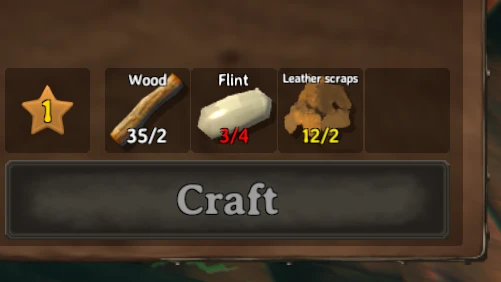
制作 建造 熔炼 烹饪 燃料 从容器中取出
aedenthorn2025-06-30 08:34:14
让你在制作、建造、使用熔炉和窑炉、添加燃料、烹饪食物等时,可以使用附近容器中的资源。

种植一切
Advize2025-09-09 11:15:37
重写了bkeyes93的种植增强模组。允许你的种植者种植浆果丛、蓟、蒲公英、蘑菇、此前无法获取的树种以及其他装饰性植物。还包括许多其他杂项功能(详见
无限制传送门
frostedplaything4102023-09-02 17:39:40
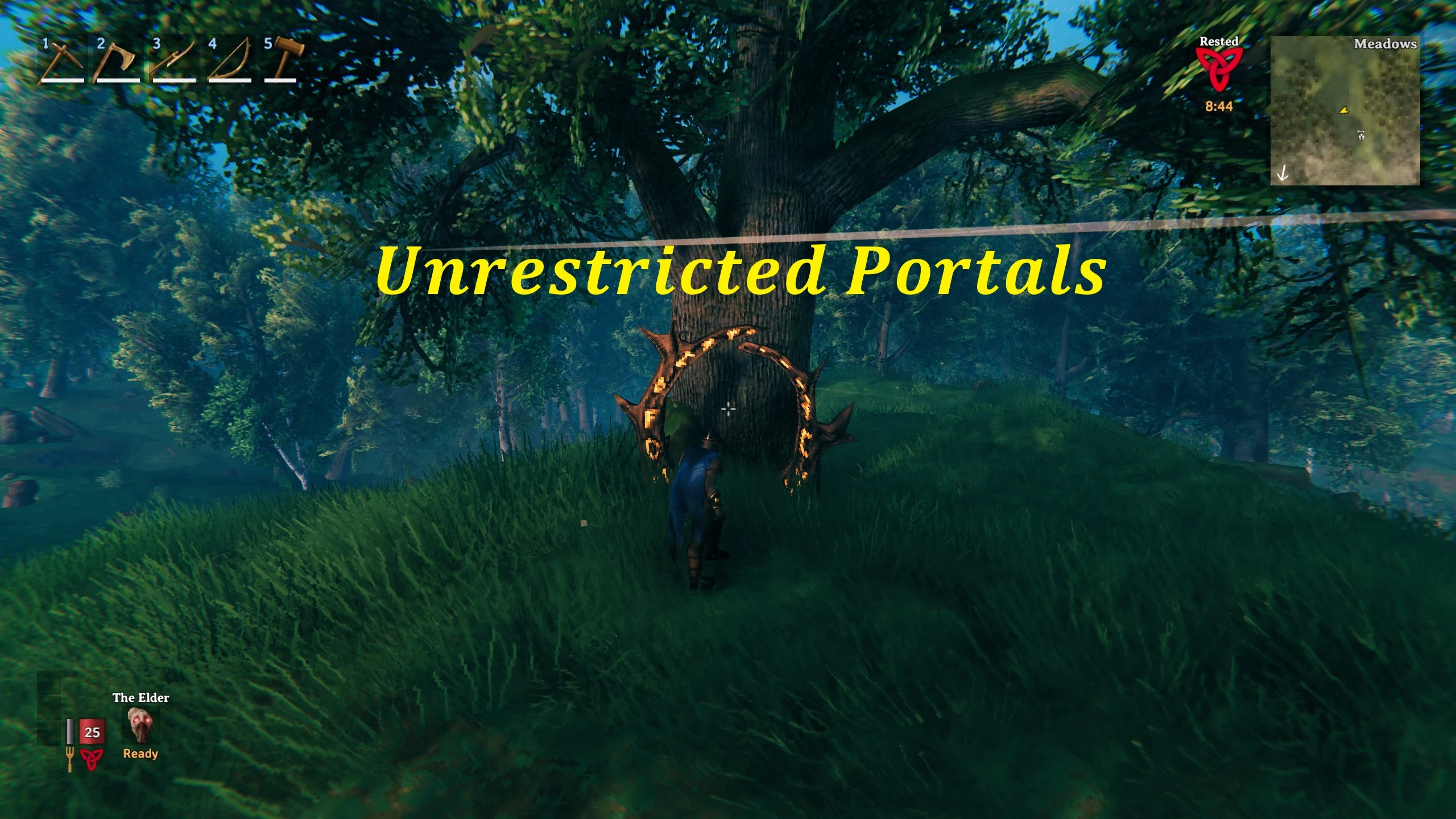
无限制传送门是一个客户端模组,允许玩家通过传送门传送任何物品。该模组提供广泛的自定义选项,让玩家能够控制物品限制、移除限制,
农场格子
Sarcenzzz2023-06-14 11:38:34
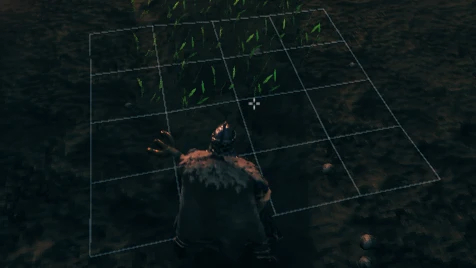
允许所有通过种植器种下的植物自动对齐并放置在网格中,确保它们有足够的生长空间。
更好的UI
MKMasa2021-04-15 09:19:42
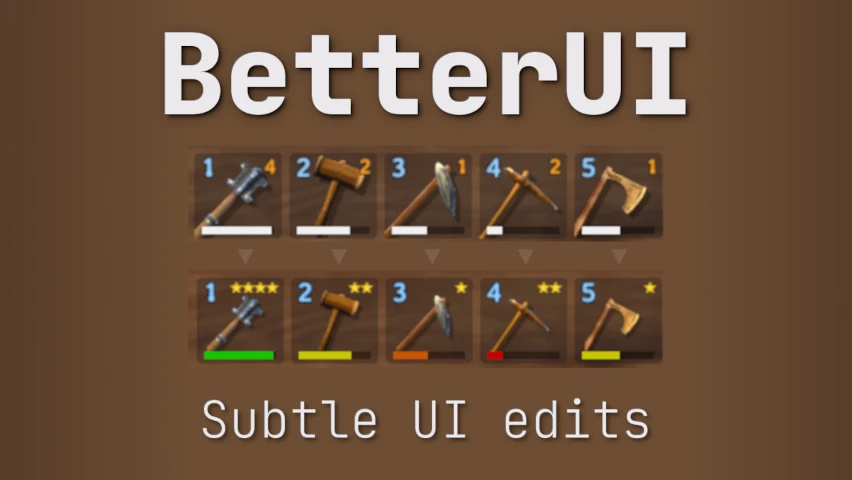
这个模组对游戏界面做了一些细微的调整。你可以编辑并选择想要启用的更新内容。

更好的射箭
Ishid42026-09-10 16:16:51
为弓术玩法添加了许多功能和改动,包括全新的箭袋系统、可回收的箭矢、更精准的瞄准以及逼真的箭矢物理效果。