
关于此 MOD
初学者友好的工具,通过简单易用的界面修改数百个游戏设置。赚取双倍现金和经验值,提高移动速度,减少范围摆动,等等!你最喜欢的模组可能是用这个构建的。
概览
Mod Builder提供了一个简单的界面来调整《猎人:野性的呼唤》中的数百个游戏设置。选择您自己的修改来自定义您的游戏体验,包括:
-增加角色的基础属性(移动速度、携带重量、健康等)
-增加现金和XP乘数,降低商店中物品的成本
-减少范围摆动,增加变焦,并从范围镜头中去除深色
-更改每种弹药类型支持的收获等级
-增加弹匣大小,减少/消除后坐力,并禁用您最喜欢的武器上的子弹掉落
-每级获得1点技能和特殊待遇-足以解锁整棵树
-修改动物感官,在不被发现的情况下偷偷接近猎物
-提高钻石的产卵率
-增加稀有皮毛类型的出现
-提高您解锁的津贴和技能的奖金
-删除每次启动游戏时播放的那些讨厌的介绍视频
…还有更多!
这是从源代码派生的原始版本并更新以适用于较新的游戏版本,包括Sundarpatan+Salzweisen地图和所有武器DLC包。该代码可在GitHub.
在《野性的呼唤》中启用模组
必须将其他启动参数添加到游戏的可执行文件中,才能在猎人:野性的呼唤中启用mod支持。这可以在两者中完成蒸汽和史诗游戏发射器。需要以下参数(包括末尾的句点):
如果您希望在无边框窗口模式下玩,您也可以在该命令的末尾添加“ /borderless”。感谢OMEGA0713测试史诗游戏版本的启动参数!
如何安装Mod Builder
1. Download the latest release from the Files page
2. Open the .7z archive (7-Zip is my recommended tool for this)
3. Extract the modbuilder.exe file and _internal folder to your computer (Desktop, Documents, wherever you want). Mod Builder requires the _internal folder to work as it contains saved profiles and configuration data.
4. Run modbuilder.exe
How to use Mod Builder
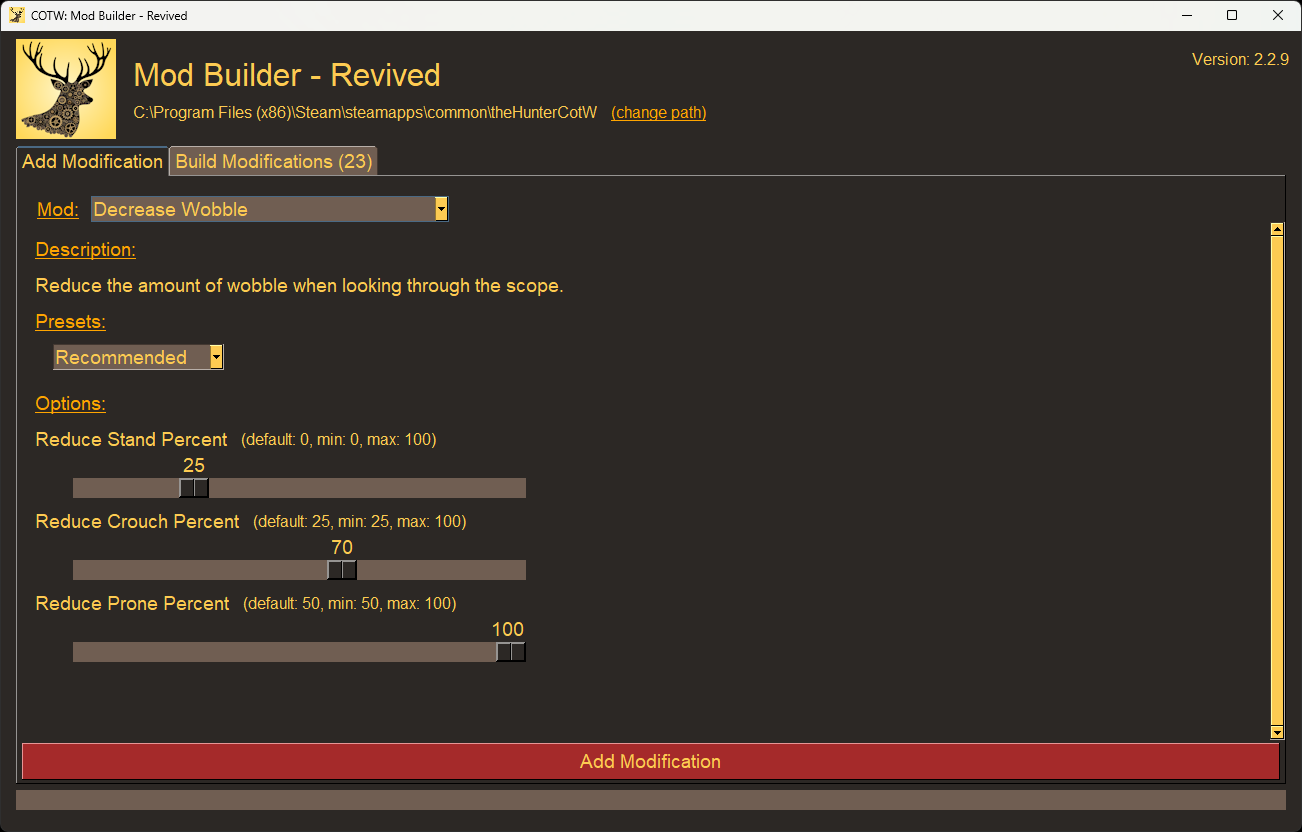
1.选择您的安装目录猎人:野性的呼唤与(改变路径)纽扣
-Mod Builder将尝试在默认的Steam和Epic Games目录中找到游戏文件
-如果您不知道您的游戏安装在哪里,请在Steam中右键单击游戏并选择属性->已安装文件->浏览以找到该文件夹。
2.使用类型下拉列表
3.配置mod设置
4.点击添加修改将更改添加到构建队列
5. Repeat steps 2-4 to select, configure, and add any additional mods
6. When you're ready to apply the mods, open the Build Modifications tab
7. RECOMMENDED: Click Save and enter a name to save your mods list
8. Click the Build Modifications button to build the modded game files
9. When the build is complete, click Replace to copy the modded files into the game directory
- Save files are stored in the "/_internal/保存"文件夹。
-的替换按钮将完全覆盖您游戏的mod文件夹。虽然这是使用Mod Builder的“最干净”方式,但您也可以使用负荷如果您的“/dropzone“文件夹。
更新Mod Builder
1.从文件页
2.解压.7z存档
3.复制模组构建器文件夹并将其粘贴到您现有的模组构建器文件夹
4.选择替换目标中的文件更新任何更改的文件
更新您的mods
1.按照上面的步骤创建您保存的mod列表并更新Mod Builder
2.运行modbuilder.exe并打开构建修改标签
3.点击负荷并选择您保存的mods列表
4.允许Mod Builder自动更新任何过时的mod
5.点击保存更新保存文件
6.点击构建修改构建修改后的游戏文件
7.构建完成后,单击负荷将修改后的文件复制到游戏目录中
已知问题
有几个损坏的mod正在更新或重写以与最新的游戏版本一起使用。有一个帖子页面上的粘性消息详细说明当前已知问题。此列表可能不完整。请报告您发现的任何问题在NexusMods上。包括您测试过的设置,以帮助我更快地排除故障和修复问题。
想要升级你的狩猎甚至更多?查看动物种群改变!
现在更新为艾伯塔狩猎保护区!动物种群改变-复活让您修改每个保护区的每只动物的属性。将雌性更改为雄性,使整个种群拥有稀有的皮毛变体,甚至将动物升级为钻石和巨兽!
学分
- 意大利面-原作者模组生成器.感谢您保持开源!
- kk49-作者和维护者德卡用于编辑游戏文件
- emon94-对探索游戏文件和测试新模组非常有帮助
Mod Builder v2.2.8兼容游戏版3028143包括艾伯塔狩猎保护区和降雪更新2025年7月17日发布
Mod Builder提供了一个简单的界面来调整《猎人:野性的呼唤》中的数百个游戏设置。选择您自己的修改来自定义您的游戏体验,包括:
-增加角色的基础属性(移动速度、携带重量、健康等)
-增加现金和XP乘数,降低商店中物品的成本
-减少范围摆动,增加变焦,并从范围镜头中去除深色
-更改每种弹药类型支持的收获等级
-增加弹匣大小,减少/消除后坐力,并禁用您最喜欢的武器上的子弹掉落
-每级获得1点技能和特殊待遇-足以解锁整棵树
-修改动物感官,在不被发现的情况下偷偷接近猎物
-提高钻石的产卵率
-增加稀有皮毛类型的出现
-提高您解锁的津贴和技能的奖金
-删除每次启动游戏时播放的那些讨厌的介绍视频
…还有更多!
这是从源代码派生的原始版本并更新以适用于较新的游戏版本,包括Sundarpatan+Salzweisen地图和所有武器DLC包。该代码可在GitHub.
在《野性的呼唤》中启用模组
必须将其他启动参数添加到游戏的可执行文件中,才能在猎人:野性的呼唤中启用mod支持。这可以在两者中完成蒸汽和史诗游戏发射器。需要以下参数(包括末尾的句点):
archives_win64存档patch_win64存档dlc_win64。如果您希望在无边框窗口模式下玩,您也可以在该命令的末尾添加“ /borderless”。感谢OMEGA0713测试史诗游戏版本的启动参数!
如何安装Mod Builder
1. Download the latest release from the Files page
2. Open the .7z archive (7-Zip is my recommended tool for this)
3. Extract the modbuilder.exe file and _internal folder to your computer (Desktop, Documents, wherever you want). Mod Builder requires the _internal folder to work as it contains saved profiles and configuration data.
4. Run modbuilder.exe
How to use Mod Builder
Check out the 文章部分有关使用Mod Builder功能的详细指南
1.选择您的安装目录猎人:野性的呼唤与(改变路径)纽扣
-Mod Builder将尝试在默认的Steam和Epic Games目录中找到游戏文件
-如果您不知道您的游戏安装在哪里,请在Steam中右键单击游戏并选择属性->已安装文件->浏览以找到该文件夹。
2.使用类型下拉列表
3.配置mod设置
4.点击添加修改将更改添加到构建队列
5. Repeat steps 2-4 to select, configure, and add any additional mods
6. When you're ready to apply the mods, open the Build Modifications tab
7. RECOMMENDED: Click Save and enter a name to save your mods list
8. Click the Build Modifications button to build the modded game files
9. When the build is complete, click Replace to copy the modded files into the game directory
- Save files are stored in the "/_internal/保存"文件夹。
-的替换按钮将完全覆盖您游戏的mod文件夹。虽然这是使用Mod Builder的“最干净”方式,但您也可以使用负荷如果您的“/dropzone“文件夹。
更新Mod Builder
1.从文件页
2.解压.7z存档
3.复制模组构建器文件夹并将其粘贴到您现有的模组构建器文件夹
4.选择替换目标中的文件更新任何更改的文件
更新您的mods
1.按照上面的步骤创建您保存的mod列表并更新Mod Builder
2.运行modbuilder.exe并打开构建修改标签
3.点击负荷并选择您保存的mods列表
4.允许Mod Builder自动更新任何过时的mod
5.点击保存更新保存文件
6.点击构建修改构建修改后的游戏文件
7.构建完成后,单击负荷将修改后的文件复制到游戏目录中
已知问题
有几个损坏的mod正在更新或重写以与最新的游戏版本一起使用。有一个帖子页面上的粘性消息详细说明当前已知问题。此列表可能不完整。请报告您发现的任何问题在NexusMods上。包括您测试过的设置,以帮助我更快地排除故障和修复问题。
想要升级你的狩猎甚至更多?查看动物种群改变!
现在更新为艾伯塔狩猎保护区!动物种群改变-复活让您修改每个保护区的每只动物的属性。将雌性更改为雄性,使整个种群拥有稀有的皮毛变体,甚至将动物升级为钻石和巨兽!
学分
- 意大利面-原作者模组生成器.感谢您保持开源!
- kk49-作者和维护者德卡用于编辑游戏文件
- emon94-对探索游戏文件和测试新模组非常有帮助
猎人:荒野的召唤 的热门 MOD
探索适用于 猎人:荒野的召唤 的最佳MOD,带来新功能、升级画面,以及令人兴奋的方式来改变您的游戏体验。
动物种群扫描仪
Ramalamadingdong72025-10-26 18:09:06
这台扫描仪会读取你的动物种群文件,并显示其中的内容。找出你的地图是否像你想象的那么空,或者你是否只是找错了地方。在实时模式下,可以看到你的杀戮和由此产生的真实再现
动物渲染距离可达750米
MetalHeron2020-05-28 00:13:49
动物渲染距离从416米到750米
重生和绝望(渲染)距离增加-550-650-750-850米选项-针对澳大利亚更新
chiconspiracy2023-06-22 09:45:28
独立产卵和去产卵距离随着多种选项的增加而增加。澳大利亚地图的初步更新。

动物种群变化
Deleted54828087User2023-07-08 01:52:06
一个允许任何人在游戏中改变所有保护区动物种群的工具。

动物种群乘数
jnthnspn2025-03-26 00:13:31
更新日期:2025年3月

移动速度提升1.4倍,实现逼真的摆动推进
Wingge2020-06-25 03:01:19
移动速度提升40%,实现逼真的摆动推进

仅限稀有毛皮
jnthnspn2025-03-25 02:54:54
更新日期:2025年3月
繁殖率提高(更新)
minecraftisbad9439294232021-04-02 10:54:16
只是一个很酷的模组,可以更好地产卵:D