关于此 MOD
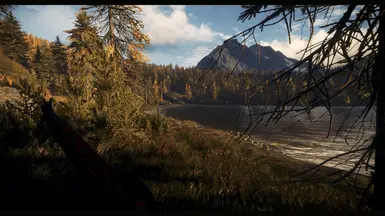
COTW ReShade-EDGE是《野性猎人的呼唤》的一组3个ReShade预设。专注于自然色彩和温暖的夜晚,只需降低3-5FPS。
COTW阴影-边缘是一组3个ReShade预设野外猎人的呼唤.
专注于自然色和温暖的夜晚,仅降低3-5 FPS。
这是我个人的不能玩没有预设。
小的顶部和底部边框是活跃的,给(我)一个更优美的印象。我也使用子小插曲作为“Lightroom”过滤器的一部分.只需取消选中您不喜欢的内容。
包括:
1. COTW ReShade-边缘-标准 (实际上可用于所有狩猎保护区)
2. COTW ReShade-边缘-Cuatro Colinas&Vurhonga Savanna(橙色的阳光适应)
3. COTW ReShade-边缘-梅德韦德-泰加(阴影适应从绿色到蓝色)
Installation | Requirements:
You need ReShade (https://reshade.me/) to apply these filters. Additional filters can be selected during installation and update. See detailed procedure below.
* In ReShade already included filters: Border, LumaSharpen
* Additional filters used: prod80, qUINT
! If ReShade is already installed, but without the above filters, just run ReShade.exe again and choose Update. Then select prod80和数量过滤器。因此,您可以确保所有依赖项(fxh文件和纹理)都已到位并且它们的路径是正确的!
提示|注意:着色器在树上闪烁
如果您在阳光下看到远处树木上烦人的reflection-flickering,只需将阴影质量从Ultra降低到High。这未连接到ReShade或者我的预设,只是在使用任何锐化滤镜时更明显一点。只是太多的小着色器——在遥远的物体上发生变化。
浸没推荐MOD:Hud Switch COTW
https://www.nexusmods.com/thehuntercallofthewild/mods/27
感谢您的使用,希望您喜欢!
克里斯
------------------------------------
详细的ReShade设置
1.下载并运行ReShade(https://reshade.me/)。在ReShade对话框中单击Click here to select a game...
2. Browse to your COTW installation folder and select theHunterCotW_F.exe
3. Back on the ReShade dialog select Direct 3D 10/11/12 on the bottom >> a window will open to Select effect packages to install
5. "Standard effects" and "SweetFX" will be already selected. Now also select qUINT by Marty McFly and color effects by prod80*。单击确定。
6.安装程序现在将下载最新版本的效果包:SweetFX、qUINT、prod80。单击3x OK,然后关闭设置。
现在您可以在游戏中使用ReShade了!
注意:任何ReShade预设只是一个文本文件(. txt或.ini),告诉ReShade要使用哪些效果以及如何配置它们。
1.将我的ReShade预设复制到#ROOT文件夹中,其中“theHunterCotW_F. exe”。开始游戏。
2. ReShade会有一点一次性介绍…按键盘上的[Pos1]打开ReShade设置。
3.在顶部下拉框中选择一个预设,点击应用。
4.可选:在设置选项卡,选择一个键,例如[Page Down],以在游戏过程中快速打开/禁用ReShade。
完成
---
*您也可以选择所有可用的效果包下载,除了底部的旧遗留版本。因此,您可以使用任何现有的ReShade预设无需下载缺失的包。
额外优势:你只需要预设的. ini文件从所有上传中。许多上传者在着色器文件夹,尽管它们可能已经被ReShade正确安装。这会导致双重加载效果的错误,相互添加(例如2x晕影,2x饱和度…)。
专注于自然色和温暖的夜晚,仅降低3-5 FPS。
这是我个人的不能玩没有预设。
小的顶部和底部边框是活跃的,给(我)一个更优美的印象。我也使用子小插曲作为“Lightroom”过滤器的一部分.只需取消选中您不喜欢的内容。
包括:
1. COTW ReShade-边缘-标准 (实际上可用于所有狩猎保护区)
2. COTW ReShade-边缘-Cuatro Colinas&Vurhonga Savanna(橙色的阳光适应)
3. COTW ReShade-边缘-梅德韦德-泰加(阴影适应从绿色到蓝色)
Installation | Requirements:
You need ReShade (https://reshade.me/) to apply these filters. Additional filters can be selected during installation and update. See detailed procedure below.
* In ReShade already included filters: Border, LumaSharpen
* Additional filters used: prod80, qUINT
! If ReShade is already installed, but without the above filters, just run ReShade.exe again and choose Update. Then select prod80和数量过滤器。因此,您可以确保所有依赖项(fxh文件和纹理)都已到位并且它们的路径是正确的!
提示|注意:着色器在树上闪烁
如果您在阳光下看到远处树木上烦人的reflection-flickering,只需将阴影质量从Ultra降低到High。这未连接到ReShade或者我的预设,只是在使用任何锐化滤镜时更明显一点。只是太多的小着色器——在遥远的物体上发生变化。
浸没推荐MOD:Hud Switch COTW
https://www.nexusmods.com/thehuntercallofthewild/mods/27
感谢您的使用,希望您喜欢!
克里斯
------------------------------------
详细的ReShade设置
1.下载并运行ReShade(https://reshade.me/)。在ReShade对话框中单击Click here to select a game...
2. Browse to your COTW installation folder and select theHunterCotW_F.exe
3. Back on the ReShade dialog select Direct 3D 10/11/12 on the bottom >> a window will open to Select effect packages to install
5. "Standard effects" and "SweetFX" will be already selected. Now also select qUINT by Marty McFly and color effects by prod80*。单击确定。
6.安装程序现在将下载最新版本的效果包:SweetFX、qUINT、prod80。单击3x OK,然后关闭设置。
现在您可以在游戏中使用ReShade了!
注意:任何ReShade预设只是一个文本文件(. txt或.ini),告诉ReShade要使用哪些效果以及如何配置它们。
1.将我的ReShade预设复制到#ROOT文件夹中,其中“theHunterCotW_F. exe”。开始游戏。
2. ReShade会有一点一次性介绍…按键盘上的[Pos1]打开ReShade设置。
3.在顶部下拉框中选择一个预设,点击应用。
4.可选:在设置选项卡,选择一个键,例如[Page Down],以在游戏过程中快速打开/禁用ReShade。
完成
---
*您也可以选择所有可用的效果包下载,除了底部的旧遗留版本。因此,您可以使用任何现有的ReShade预设无需下载缺失的包。
额外优势:你只需要预设的. ini文件从所有上传中。许多上传者在着色器文件夹,尽管它们可能已经被ReShade正确安装。这会导致双重加载效果的错误,相互添加(例如2x晕影,2x饱和度…)。
猎人:荒野的召唤 的热门 MOD
探索适用于 猎人:荒野的召唤 的最佳MOD,带来新功能、升级画面,以及令人兴奋的方式来改变您的游戏体验。
动物种群扫描仪
Ramalamadingdong72025-10-26 18:09:06
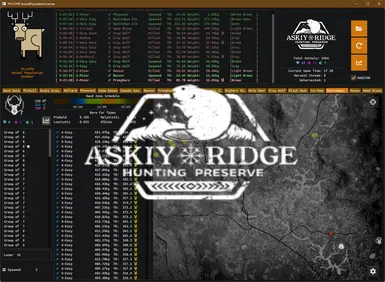
这台扫描仪会读取你的动物种群文件,并显示其中的内容。找出你的地图是否像你想象的那么空,或者你是否只是找错了地方。在实时模式下,可以看到你的杀戮和由此产生的真实再现
动物渲染距离可达750米
MetalHeron2020-05-28 00:13:49
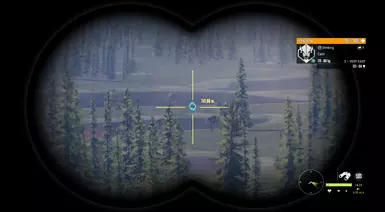
动物渲染距离从416米到750米
重生和绝望(渲染)距离增加-550-650-750-850米选项-针对澳大利亚更新
chiconspiracy2023-06-22 09:45:28
独立产卵和去产卵距离随着多种选项的增加而增加。澳大利亚地图的初步更新。
动物种群变化
Deleted54828087User2023-07-08 01:52:06
一个允许任何人在游戏中改变所有保护区动物种群的工具。

动物种群乘数
jnthnspn2025-03-26 00:13:31
更新日期:2025年3月
移动速度提升1.4倍,实现逼真的摆动推进
Wingge2020-06-25 03:01:19
移动速度提升40%,实现逼真的摆动推进
仅限稀有毛皮
jnthnspn2025-03-25 02:54:54
更新日期:2025年3月
繁殖率提高(更新)
minecraftisbad9439294232021-04-02 10:54:16
只是一个很酷的模组,可以更好地产卵:D