

关于此 MOD
This mod makes all areas and side-missions progressively scale up according to your advancement in the main mission, in Normal mode and TVHM. Level restrictions on the DLCs are lifted, so they can be played anytime during NVHM/TVHM, and they will also scale up according to the progress in the main game story.
这意味着,例如,你可以回去训练18级大黄蜂的Knuckledragger。或者在8级开始Tiny Tina的DLC,在回到主游戏之前执行几个任务,然后在28级完成DLC。或者一遍又一遍地堆雪人。与UVHM(或“1级UVHM”模组)不同,这些区域/任务并不总是完全处于你的级别(但只要你跟上主要故事,就足够接近)。然而,这个模组并没有改变正常和TVHM游戏过程及其平衡的任何其他方面。
安装和兼容性
使用BLCMM要安装NVHM-TVHM面积缩放:
- 安装BLCMM
- 由于最近的更新,BLCMM不再能够为mods设置游戏文件。因此,您需要使用Cody的Hex多任务工具例如。
- 在BLCMM中打开NT-ReaScaling.blcm(如果你想将其与其他模组组合,请使用“文件”>“导入模组文件”)
- In BLCMM > File > Save as: select "Open BL2 Binaries Dir", and save it under any name you like (e.g. mymods.txt)
- 启动游戏,进入主菜单,选择新游戏、角色等。
- 按“Esc”退出标题菜单,并显示“按任意键继续”(根据您的平台,此步骤可能不是必需的)。
- 打开控制台(使用您在BLCMM中为mods设置游戏文件时选择的键),然后键入例如“exec mymods.txt”。
- 关上控制台,你就可以走了。
NVHM-TVHM区域缩放应该与任何其他模组兼容,只要这些模组不涉及区域级别定义,但涉及的模组并不多。如果你使用的是UCP,请禁用目录“敌人更改>在正常模式下使Terramorphous级别40”。
NVHM-TVHM区域缩放可以在加载任何保存游戏之前应用:它应该自动放大相关区域。如果稍后在没有NVHM-TVHM区域缩放的情况下重新加载保存,则区域将恢复到香草的可接受范围内。
It is a relatively big file (>2 MB, more than half the UCP), so it may take a few seconds to load. The DLC sections may be disabled at will using BLCMM (in case you don't own some of the DLCs, or if you don't want to play them with the NT-AreaScaling modifications). This mod does absolutely nothing in UVHM, so there's not much point loading it when playing in UVHM.
详细更改
- 在一定范围内(例如,在正常模式下完成野生动物保护后,所有区域应扩大到19-21),将其中一个主要故事任务(不是全部,而是大多数)交给你,将使所有先前的区域和不被接受的次要任务扩大到你的级别。
- 一些地区将直接扩大规模,其他人可能需要保存/退出.
- 已经接受的任务(及其奖励)永远不会扩大,但它们发生的地区和你战斗的敌人应该扩大。
正常模式
- 完成主要故事并杀死战士将使所有区域升级到30级。
- The mission You. Will. Die. (Terramorphous) will be between level 30 and 35 (depending on your level when you finish the main story). Completing this mission should make all areas in the main game and headhunter DLCs scale up to 35.
- 一些地区,如腐蚀洞穴或林奇伍德,在香草游戏中有一种特殊的行为,这种行为在这里大多得到了保护。但在杀死战士/特拉后,他们也会扩大到30/35。
DLC
- 所有DLC都将缩放到您的级别(当您第一次前往该地区时),在5到35之间的任何级别(Lilith DLC为5-38)。
- 主游戏故事的进展将扩大DLC中已经访问过的区域。DLC区域通常需要保存/退出。
- DLC突袭boss任务(以及一些竞技场战斗,如Murderlin's Temple)将在30到35级之间(Lilith DLC突袭bos为35-38级)。
- 完成突袭首领任务(Hyperius、Pyro Pete、Vorac、Dragons、Haderax)将使相应DLC中的所有区域达到35级(Lilith DLC为38级)。
- Lilith DLC的工作原理与其他DLC相同,但限制略有不同,因为该DLC的级别上限为香草NVHM中的38。
TVHM
- 同样的事情,除了Terramorphous任务是50级,就像香草一样。
- 完成主要故事并杀死战士将使所有区域升级到50级,就像香草一样。(但是请注意,一些猎头DLC和Lilith DLC在香草中没有重新缩放到50,但他们使用了这个模组)。
DLC
- 所有DLC都将扩展到您的级别(当您第一次前往该地区时),在30到50之间的任何级别。
- 主游戏故事的进展将扩大DLC中已访问的区域,与正常模式中的系统相同。
- DLC突袭boss和一些锁定在50级的任务现在可以在30到50之间的任何级别上玩。他们还将扩大规模:例如,你可以在42级与Pyro Pete战斗,然后在48级再次回来与他战斗。
- Lilith DLC的工作原理与其他DLC相同,尽管它的香草TVHM上限为52。使用此模式,设置的限制与其他DLC(30-50)中的限制相同,因为在UVHM之前,将水平提高到50以上通常不是一个好主意。
已知问题
A) In general, if you start a character with this mod, it is preferable to make sure you don't forget to exec the mod before loading the character again. However, you can generally switch between using the mod and not using it, without any problems, except in one situation (described below).
如果您出现以下情况,您可能会遇到问题:
- 使用NVHM-TVHM区域缩放,开始以比原版更低的级别播放一些DLC。
- 稍后加载您的保存文件,不使用mod。然后,游戏将在香草的可接受范围内重置DLC区域(例如Tiny Tina DLC的30-35)。
- 这些区域将停留在该级别(对于您当前的角色来说可能太高),因为NVHM-TVHM区域缩放将不 rescale these areas back down. This is because 30-35 are still considered acceptable level values by the mod, which is necessary to let players start the DLCs at any level.
这个问题不会影响主要游戏区域。它不会影响您尚未访问的DLC区域。这只是正常模式下的问题(因为在TVHM中,最糟糕的情况是将30级区域扩展到35级)。
如果发生这种情况,您可以暂时忽略有问题的DLC,玩主游戏或其他DLC,稍后再回来。
或者,您可以使用可选文件NT-AreaScaling-DLCreset.blcm其被提供:
- 执行此文件而不是主mod文件,然后加载角色。这应该将所有在正常模式下访问的DLC区域设置为5级(检查是否确实如此,否则可能会保存/退出并返回)。
- 保存/退出并执行NT-AreaScaling.blcm,然后重新加载角色。访问的DLC区域应根据您在主要故事中的进度进行扩展。这意味着,如果这些区域对于你目前的级别来说仍然太低,你必须先完成一些主要任务。
B) Some loot pools have a minimum level requirement. For example, relics won't spawn anywhere until you reach a certain level, etc. Usually you get something else instead. But it is possible that some chests in DLC areas just won't spawn any loot at all, if you play them at very low level. I don't think there are many, but this is notably the case for the Train chests in the Mercenary Day (snowman) DLC, until level 15 (maybe?). The problem should fix itself as you level up a bit more. You can try using the 早熟Apocalytech的mod,可以解锁1级的所有物品池(因此对早期游戏平衡也有其他影响)。
无主之地2 的热门 MOD

Borderlands Community Mod Manager
LightChaosman2020-05-23 01:08:43
The tool to use with Borderlands 2 / TPS mods. Allows users to disable unwanted parts of the mods, merge mods into one file.Automatically handles the tedious process of manually merging the files, and prevents the broken mods resulting from
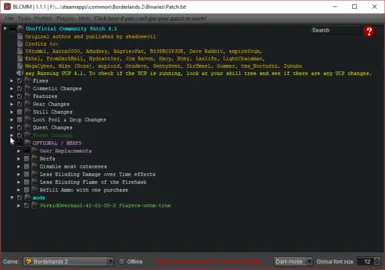
Borderlands社区模组经理
LightChaosman2020-05-23 01:08:43
该工具与无主之地2/TPS模组一起使用。允许用户禁用模组中不需要的部分,将模组合并到一个文件中。自动处理手动合并文件的繁琐过程,并防止因以下原因导致的损坏模组
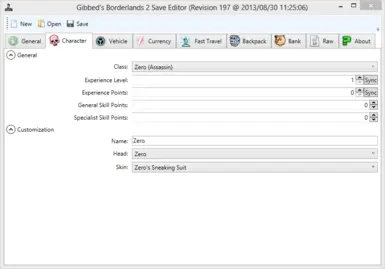
Gibbed的BL2保存编辑器
KaptainCnucklz2020-06-02 05:55:27
用于编辑BL2保存文件的作弊实用程序的镜像。更新于2020年。

Gibbed's BL2 Save Editor
KaptainCnucklz2020-06-02 05:55:27
Mirror of a cheat utility for editing BL2 save files. Updated 2020.
Borderlands 2非官方社区补丁
shadowevil19962022-01-06 23:02:53
《无主之地2》非官方社区补丁终于登陆Nexusmods,对游戏的许多方面进行了450多次更改和修复!

Borderlands 2非官方社区补丁
shadowevil19962022-01-06 23:02:53
《无主之地2》非官方社区补丁终于登陆Nexusmods,对游戏的许多方面进行了450多次更改和修复!
Borderlands十六进制多工具
c0dycode2022-08-13 18:06:08
Borderlands Hex Multitool允许您方便地将各种Hexcedits应用于您的exe文件(BL2和TPS)。

Borderlands十六进制多工具
c0dycode2022-08-13 18:06:08
Borderlands Hex Multitool允许您方便地将各种Hexcedits应用于您的exe文件(BL2和TPS)。